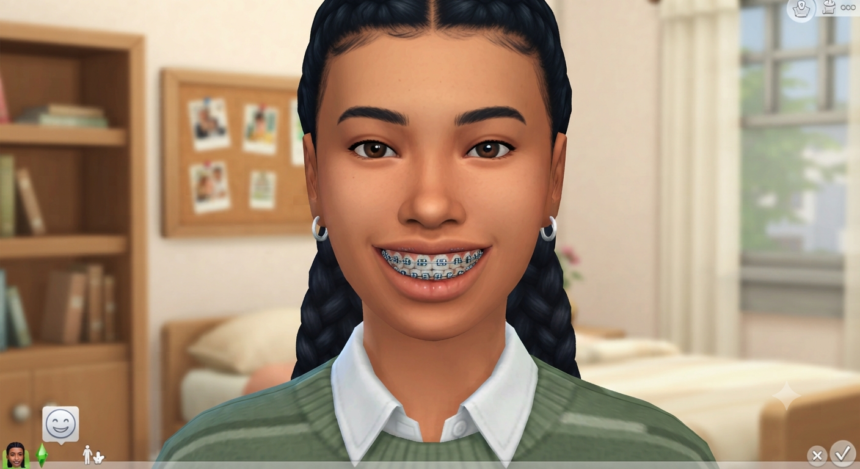
Sims 4 CC braces are one of those small Create-a-Sim details that can completely change a character. A set of metal brackets, colorful bands, a retainer, or orthodontic headgear can make a teen look younger, give a makeover storyline more continuity, or simply add the kind of everyday realism that standard CAS sometimes lacks.
The useful part is that braces custom content is no longer limited to one format. Creators make complete teeth meshes with braces attached, recolors of EA-style braces, accessory overlays designed to sit over other teeth, and even gameplay mods that can temporarily give children or teens orthodontic changes.
That variety is great. It also explains why one download can work perfectly while another clips through the teeth, disappears with certain presets, or occupies a surprising CAS category.
This guide breaks down how Sims 4 CC braces work, which types make sense for different players, how to install them correctly, and what to check when braces refuse to show up.
What Are Sims 4 CC Braces?
Sims 4 CC braces are custom Create-a-Sim assets that change the appearance of a Sim’s teeth or add orthodontic hardware around the mouth. Depending on how the creator built the item, you might find it under Teeth, Face Paint, Skin Details, Tattoos, Scars, Earrings, or another accessory category.
That distinction matters more than it sounds.
A complete teeth mesh replaces the selected teeth. An accessory brace, by comparison, is designed to layer over an existing teeth preset.
For example, WightSpider07’s adult braced-teeth set includes multiple teeth types, gum colors, and brace recolor options, while accessory braces published through Daydream Archives were specifically designed to work alongside other teeth.
The Five Main Brace Formats
Before downloading an entire CC collection, identify what you’re actually getting:
- Braced teeth meshes: Teeth and brackets are combined into one CAS item. These usually provide the most predictable positioning.
- Brace overlays: The orthodontic hardware is separate, allowing you to use compatible custom teeth underneath.
- Colored brace recolors: These mainly change brackets or elastic colors without completely redesigning the teeth.
- Orthodontic headgear: More visible hardware suited to specialized storytelling, historical looks, or distinctive teen Sims.
- Gameplay braces mods: These go beyond CAS and can introduce temporary braces or tooth changes during gameplay.
This distinction is critical when comparing Sims 4 CC braces, because two downloads labeled “braces” may function completely differently.
Sims 4 CC Braces vs. the Game’s Built-In Braces
The Sims 4 already includes teeth customization and EA-style braces. Community discussion around the January 2017 CAS additions documented editable teeth and braces, while later creators used the original game design as a base for expanded color options.
So why install custom content?
Choice.
Sims 4 CC braces can provide:
- More band and bracket colors
- Alternative gum shades
- Different tooth shapes
- Less symmetrical smiles
- Additional age support
- Alpha or realistic textures
- Maxis Match alternatives
- Accessory versions for custom teeth
- Retainers and related orthodontic details
- More flexibility for storytelling
GalaxyUnicorn1’s Colored Braces, for instance, took the EA-style braces and expanded them with seven colored swatches.
For players running a mostly vanilla save, the standard game braces may be enough. For legacy storytellers, CAS creators, realistic-save players, and anyone who wants more individuality between siblings or townies, custom options provide significantly more control.
Best Types of Sims 4 CC Braces to Look For
There isn’t one universal “best” package.
The ideal choice depends on whether you’re prioritizing Maxis Match consistency, realism, color variety, age compatibility, performance, or compatibility with custom teeth.
1. Maxis Match Braced Teeth
Maxis Match Sims 4 CC braces are designed to blend naturally with the visual language of EA’s CAS assets. They’re a strong choice if your hairstyles, skins, eyes, makeup, and clothing already follow the game’s semi-stylized aesthetic.
WightSpider07’s Teeths Braces 01 sets are a good illustration.
The adult release lists:
- Four teeth types
- 14 brace colors
- Two gum colors
- Base-game compatibility
The child version expands the range to eight teeth types, includes 14 brace colors and two gum colors, and is listed as compatible with the game’s tooth-loss functionality.
Multiple tooth shapes are especially valuable for rotational and legacy saves.
If every sibling has the same perfectly uniform smile, faces can begin looking artificially similar. Slight variation in teeth and orthodontic details helps establish individual identity without dramatically changing facial presets.
2. Colored Braces for Personality-Driven CAS
Colored braces are particularly effective for child and teen Sims because they can reinforce personality without requiring an entirely different outfit.
Think:
- School colors
- Pastel combinations
- Rainbow bands
- Favorite colors
- Seasonal shades
- Monochrome looks
- Not So Berry-inspired palettes
Glowtrait’s AFO Braces are described as working for all ages and genders, with eight swatches consisting of solid and patterned options.
WightSpider07’s sets, meanwhile, use a 14-color brace selection inspired by Not So Berry colors.
When downloading colorful Sims 4 CC braces, check whether the color is integrated into the teeth themselves or provided through a separate overlay.
Separate overlays often give you more freedom. They can also introduce additional CAS-slot conflicts, so flexibility comes with a small compatibility trade-off.
3. Accessory Braces for Custom Teeth Users
Accessory Sims 4 CC braces are arguably the most useful choice for players who already have favorite custom teeth presets.
Instead of replacing the teeth, they place the brackets over them.
This solves a surprisingly common CAS problem: you finally find the perfect irregular, gapped, realistic, or stylized teeth for your Sim—but the creator didn’t make a braced version.
Daydream Archives created accessory braces and retainers specifically around this use case, describing them as items intended to pair with other teeth.
There is one limitation.
An accessory overlay cannot automatically reshape itself to every custom teeth mesh.
If the underlying teeth are unusually wide, narrow, protruding, recessed, tall, or heavily stylized, the brackets may:
- Float away from the teeth
- Sink into the teeth
- Clip through the lips
- Become partially hidden
- Look misaligned when the Sim smiles
For difficult presets, a complete braced-teeth mesh is usually the cleaner solution.
4. Alpha and High-Detail Braces
Alpha-style Sims 4 CC braces target players who prefer realistic skins, highly detailed facial textures, and screenshot-focused CAS setups.
These items can look impressive during close-up portrait photography because the brackets, gums, and teeth may contain substantially more mesh and texture detail than standard Maxis Match CC.
Magic Bot’s additional alpha teeth are a useful example of the trade-off. The creator identifies the teeth as high-poly at roughly 20,000 polygons and offers a separate high-poly colored braces overlay, along with HQ and color-slider compatibility.
High-poly does not automatically mean “bad.”
It simply means you should be selective.
If your computer already loads hundreds or thousands of high-detail hairs, skins, accessories, lashes, nails, clothes, and presets, adding many more high-poly CAS assets can increase the workload compared with a lightweight Maxis Match setup.
For screenshots? Great.
For an enormous population and a modest computer? Use some restraint.
5. Orthodontic Headgear for Storytelling
Not every braces look should be subtle.
Orthodontic headgear CC introduces external wires, straps, or visible hardware that can immediately establish a particular era, treatment style, or intentionally awkward stage in a character’s life.
Llazyneiph’s orthodontist headgear supports teens, young adults, adults, and elders and is categorized under Earrings. The creator also notes that its texture occupies the hat UV space, which can cause conflicts with hats or CC using that same texture area.
A child version is available separately.
That’s a perfect example of why documentation matters with Sims 4 CC braces.
The package can be installed correctly and still look wrong when combined with another CAS object. The problem isn’t necessarily broken CC—it may simply be a texture-space conflict.
How to Choose Sims 4 CC Braces That Actually Work
Preview images are useful, but they shouldn’t be your only selection criteria.
Before downloading anything, inspect the creator’s technical notes.
Look for:
- Supported ages: Child, teen, young adult, adult, elder, or multiple age groups.
- Frame compatibility: Masculine frame, feminine frame, or both.
- Base-game compatibility: Check whether additional packs are required.
- CAS category: Teeth, Face Paint, Earrings, Skin Details, Scars, Tattoos, etc.
- Number of swatches: Especially important for colored braces.
- Randomization settings: “Disabled for Random” can prevent random townies from spawning with an item.
- Known conflicts: Look for UV issues, preset restrictions, clipping, or mod-tuning conflicts.
- Mesh requirements: Some recolors require another creator’s original mesh.
- Update information: Particularly important for gameplay mods.
One orthodontic-headgear release, for example, explicitly states that it is disabled for random generation and warns about its hat UV usage.
For simple cosmetic CAS assets, an older release isn’t automatically unusable.
Gameplay mods are different.
If a mod edits game tuning or automation systems, a major patch is more likely to affect it. EA currently recommends checking the creator’s website after game updates and verifying that the mod is compatible with the latest version.
How to Install Sims 4 CC Braces Correctly
EA’s current PC and Mac instructions say downloaded custom content should be extracted if it comes in a compressed archive and then placed in the game’s Mods folder. Players must also enable Custom Content and Mods through the game settings.
Use this clean installation workflow:
- Download the original file from the creator’s page or an established CC platform.
- If the download ends in
.zipor.rar, extract it first. - Open your Documents folder.
- Navigate to Electronic Arts > The Sims 4 > Mods.
- Create an organizational folder such as CAS > Teeth & Braces if desired.
- Place the required
.packagefile inside. - Launch The Sims 4.
- Open Game Options > Other.
- Confirm Enable Custom Content and Mods is switched on.
- Restart the game after changing the setting.
- Enter Create-a-Sim and check the category specified by the creator.
EA’s updated installation guide specifically instructs players to extract compressed downloads, move the unzipped content into the Mods folder, enable CC through Game Options, and restart where necessary.
Most cosmetic Sims 4 CC braces are ordinary package-based CAS content rather than script mods.
So if a basic teeth .package doesn’t appear, don’t immediately start changing script-mod settings. First confirm that the file was extracted, placed in the correct folder, and searched for in the right CAS category.
Where to Find Braces in Create-a-Sim
This is where many players mistakenly assume their download is broken.
It may simply be hiding somewhere unexpected.
Depending on how the creator built the item, Sims 4 CC braces may appear under:
- Teeth
- Face Paint
- Skin Details
- Acne
- Scars
- Tattoos
- Earrings
- Another accessory category
Kliekie’s Braces for Everybody, for example, are located in Face Paint and come as separate adult and child packages.
Llazyneiph’s orthodontic headgear is found under Earrings.
Magic Bot’s separate colored-brace overlay uses categories including acne, scars, and tattoos.
So before deleting a supposedly broken package, read the creator’s description.
You might simply be looking in the wrong place.
Why Sims 4 CC Braces Are Not Showing Up
If your braces don’t appear, troubleshoot systematically.
Start with the simplest explanations.
Custom Content Was Disabled After an Update
Game updates can require players to re-enable mods and custom content.
EA’s troubleshooting guidance directs players to Game Options > Other > Enable Custom Content and Mods, then restart the game and check whether the content works correctly.
The Archive Was Never Extracted
A common beginner mistake is placing the downloaded .zip or .rar directly into the Mods folder.
EA’s installation instructions say compressed downloads should be unpacked before the mod files are placed inside the Mods directory.
Check the extension.
You generally want the actual .package file for normal CAS content.
You’re Looking in the Wrong Category
Accessory braces frequently live outside the Teeth menu.
Check:
Face Paint → Skin Details → Scars → Acne → Tattoos → Earrings
Then compare those locations with the creator’s installation notes.
The Age Group Is Unsupported
A child-specific teeth mesh may not appear for teens or adults.
Likewise, an adult file may not automatically work on children.
Several existing creators distribute distinct versions for different age groups, which is why reading the supported-age information matters.
Another Mouth Item Is Conflicting
If the braces appear but look distorted, temporarily remove:
- Custom teeth
- Mouth presets
- Face overlays
- Teeth defaults
- Lip-related accessories
- Face paint
- Other orthodontic overlays
Test the braces alone.
Then restore other CC one item at a time.
This is particularly useful with accessory braces because the overlay’s bracket placement may not perfectly match every third-party teeth mesh.
The Game Patch Changed Compatibility
EA recommends checking the creator’s page after game updates to verify that a mod still works with the current version and replacing outdated versions when the creator publishes an update.
This matters most when your Sims 4 CC braces come with actual gameplay behavior rather than being a simple visual package.
Cosmetic Braces vs. Gameplay Braces Mods
Most braces CC is cosmetic.
You select it in Create-a-Sim, and it stays there until you manually change your Sim.
Gameplay mods can work differently.
Sims4Me’s Braces and Teeth Change For Child and Teen, for example, is designed to introduce temporary tooth gaps, missing teeth, or braces for children and teens. As of its February 8, 2026 release listing, it requires Parenthood and warns that it can conflict with other mods modifying the same tuning.
That’s a completely different experience.
Instead of deciding, “My Sim wears braces now,” the appearance becomes part of life-stage progression.
For storytelling players, that can be fantastic.
For low-maintenance players, it creates additional compatibility responsibility.
Choose ordinary Sims 4 CC braces when you want:
- Maximum manual control
- Simpler installation
- Fewer tuning conflicts
- Consistent appearance
Choose a gameplay braces mod when you want:
- Automatic progression
- Temporary orthodontic stages
- Child or teen development events
- More unpredictable storytelling
Neither approach is objectively better.
They solve different problems.
How to Build More Realistic Sims With Braces
One mistake CAS creators make is treating braces as an isolated “cute accessory.”
They look more convincing when the rest of the character supports the story.
Try combining Sims 4 CC braces with:
- Slightly irregular or characterful teeth
- Age-appropriate skin details
- Subtle acne for some teen Sims
- Natural lip presets that don’t hide the brackets
- Hairstyles that suit the Sim’s life stage
- Expressions or poses where the teeth are actually visible
- Retainers for a post-braces storyline
- Changing band colors over time
There’s also an opportunity here for legacy storytelling.
Instead of creating a Sim with braces and forgetting about them, build a progression.
For example:
Childhood: Slightly gapped teeth.
Early teen: Braces fitted.
Mid-teen: Different elastic colors as their personal style develops.
Late teen: Braces removed.
Young adult: Retainer.
Later adulthood: Final unbraced teeth preset.
You don’t necessarily need a script mod to create that storyline.
Careful CAS editing at each birthday is enough.
Creating Better Teen Sims With Sims 4 CC Braces
Teen Sims can sometimes look too close to young adults because both stages share many body proportions, hairstyles, clothes, and facial options.
Orthodontic details help visually separate those life stages.
Sims 4 CC braces can make teens appear younger without forcing exaggerated facial presets.
The strongest approach is subtlety.
Instead of piling every “teen” marker onto one Sim, combine just a few:
- Braces
- Mild skin texture
- Youthful hairstyle
- School-friendly clothes
- Natural makeup
- Less sculpted facial details
That produces a believable teenager rather than a caricature.
And because braces are visible primarily when a Sim smiles or talks, the effect remains surprisingly understated during normal gameplay.
Maxis Match vs. Alpha Braces: Which Is Better?
Neither is universally better.
The right answer depends on the rest of your game.
Choose Maxis Match if:
- Most of your CC resembles EA assets.
- You want smooth integration with normal gameplay lighting.
- Performance and consistency matter.
- You use many random townies or large households.
- You don’t want braces dominating the face.
Choose Alpha if:
- Your Sims use realistic skins and eyes.
- You take close-up portraits.
- You use HQ-compatible CAS assets.
- Detailed teeth textures matter to you.
- Your computer comfortably handles heavier CC.
Mixing the two can work, but contrast becomes noticeable.
Ultra-realistic teeth with detailed gum textures can look unusual on a Sim using completely vanilla skin, eyes, eyelashes, and lips.
Think of Sims 4 CC braces as part of an overall visual system rather than a standalone download.
Organizing Sims 4 CC Braces in a Large Mods Folder
Good organization becomes crucial once you’re downloading multiple teeth sets.
Random filenames might feel harmless today. Six months later, when something breaks after a patch, they’re a nightmare.
A useful folder hierarchy is:
Mods > CAS > Teeth > Braces > Creator Name
For example:
Mods > CAS > Teeth > Braces > WightSpider07
You can also separate formats:
- Braced Teeth
- Accessory Braces
- Retainers
- Headgear
- Brace Recolors
- Gameplay Mods
Don’t immediately merge newly downloaded Sims 4 CC braces into giant package collections.
Test first.
If one file produces disappearing faces, strange teeth, floating brackets, or category conflicts, you want to identify and remove it quickly.
Are Sims 4 CC Braces Safe?
Custom content is created by third parties, so sensible download habits matter.
Use the creator’s original download page or established custom-content platforms when possible. Read requirements, check whether another mesh is needed, and review compatibility information before installation.
EA’s current guidance also recommends checking creators’ sites following updates and removing or replacing mods that are no longer compatible.
Back up important saves before major CC changes.
EA provides a dedicated backup and restoration process for The Sims 4, which is useful when you’re making significant changes to your game setup.
For ordinary CAS .package content, your most common problem is likely to be visual incompatibility or outdated CC rather than sophisticated gameplay conflicts.
Gameplay and tuning mods deserve additional attention because they modify systems instead of merely displaying a mesh or texture.
Common Mistakes to Avoid
Even experienced CC users occasionally make these mistakes.
Downloading CC Without Reading the Description
The creator may have already explained:
- Which category contains the braces
- Which ages are supported
- Whether another mesh is required
- What conflicts to expect
Skipping that information creates unnecessary troubleshooting.
Assuming Every Brace Overlay Fits Every Teeth Preset
It won’t.
Accessory braces offer flexibility, not universal mesh compatibility.
Installing Too Many Similar Packages at Once
Install a small batch, open CAS, and test.
That makes troubleshooting dramatically easier.
Choosing Braces Only From the Preview
A heavily edited CC preview may look different from ordinary gameplay.
Check the item under multiple facial expressions and camera angles.
Forgetting About Other Outfits
If you’re using an accessory-category brace, verify your Sim’s:
- Everyday
- Formal
- Athletic
- Sleep
- Party
- Swimwear
- Hot weather
- Cold weather
Depending on how the creator configured the item, it may not automatically carry across every outfit.
How to Test Braces Before Keeping Them
Once you install new Sims 4 CC braces, don’t just view your Sim from the front.
Rotate the head.
Zoom in.
Change expressions.
Look specifically for:
- Brackets floating above teeth
- Braces passing through lips
- Missing brackets at the sides
- Gum clipping
- Texture artifacts
- Discoloration
- Teeth appearing through the face
- Conflicts with lipstick
- Conflicts with custom tongue or mouth accessories
Then test the Sim in Live Mode.
CAS lighting and facial expressions don’t represent every animation you’ll see during gameplay.
A package that looks flawless with a neutral expression might clip badly during a wide smile.
FAQ About Sims 4 CC Braces
1. Does The Sims 4 Already Have Braces Without CC?
Yes.
The Sims 4 includes editable teeth and an EA-style braces option, with community records of braces appearing alongside the game’s expanded teeth customization in early 2017. Custom versions remain popular because creators can add more colors, meshes, age options, overlays, and realistic details.
If you only want simple metal braces, check the standard CAS teeth choices before downloading additional content.
2. Where Do Sims 4 CC Braces Appear in CAS?
There is no universal location.
Some Sims 4 CC braces appear under Teeth, while accessory versions can occupy Face Paint, Skin Details, Scars, Acne, Tattoos, Earrings, or other slots.
Kliekie’s braces, for example, use Face Paint, while Llazyneiph’s orthodontic headgear is categorized under Earrings.
Always check the creator’s description.
3. Can Children and Teens Both Use Custom Braces?
Yes—provided the creator enabled those age groups.
Some sets use separate child and adult files, while others support wider age ranges. WightSpider07 has separate child and adult braced-teeth releases, while Glowtrait describes AFO Braces as suitable for all ages and genders.
Don’t assume an adult package automatically works on children.
4. Why Are My Braces Clipping Through Custom Teeth?
The brace overlay and teeth were probably created around different mesh shapes.
A standalone overlay cannot dynamically reshape itself for every custom tooth preset. Wide, narrow, protruding, recessed, or stylized teeth may therefore cause brackets to float or clip.
Try another teeth preset.
If the problem continues, use Sims 4 CC braces where the teeth and brackets are included as one complete mesh. Because both components were designed together, positioning is generally easier to control.
5. Do I Need a Gameplay Mod to Give My Sim Braces?
No.
Standard Sims 4 CC braces are generally Create-a-Sim assets that you apply manually.
You only need a gameplay-oriented mod if you want orthodontic or teeth changes to appear through a progression system rather than controlling them yourself in CAS.
Sims4Me’s child-and-teen braces and teeth mod is an example of the gameplay approach and requires Parenthood according to its current listing.
Final Takeaway
Sims 4 CC braces work best when you choose them by function rather than downloading whatever has the prettiest thumbnail.
First decide what you actually need:
Complete braced teeth?
Choose a dedicated teeth mesh.
Want to keep your favorite teeth preset?
Try accessory braces.
Building colorful teens?
Look for recolors with multiple bands or elastic swatches.
Creating realistic screenshots?
Consider detailed alpha options.
Telling an orthodontic storyline?
Add retainers, headgear, or a progression mod.
Then read the creator’s compatibility notes, confirm the supported ages and CAS category, install the package cleanly, and test it before filling your Mods folder with dozens of alternatives.
For the easiest starting point, install one well-documented braced-teeth package and one separate accessory-braces option. Compare them on the same Sim, rotate the face, test several smiles, and check the results in Live Mode.
Keep whichever version fits naturally without floating, clipping, or fighting with your other CC.
That approach gives you better-looking Sims, cleaner storytelling, and a Mods folder that’s far easier to manage when the next game update arrives.