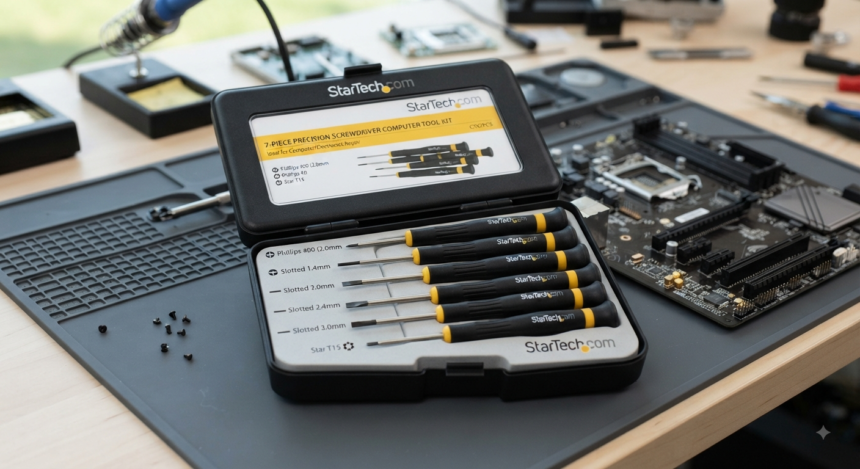
The StarTech.com 7 Piece Precision Screwdriver Computer Tool Kit is a compact, purpose-built set for technicians, PC builders, and hobbyists who want common computer screwdrivers without carrying a 40- or 60-bit electronics kit. Sold under product ID CTK100P, it combines seven magnetic precision drivers in fixed sizes and a compact storage format suitable for bench work or field service.
What makes this kit interesting is not the piece count. It is the choice of sizes: three slotted drivers, two Phillips drivers, and two Torx drivers, each with a 50 mm shaft. That focused selection makes the StarTech.com 7 Piece Precision Screwdriver Computer Tool Kit useful for traditional PC maintenance and selected hardware servicing tasks, while also giving it clear limitations on devices that require smaller or specialty fasteners.
What Is the StarTech.com 7 Piece Precision Screwdriver Computer Tool Kit?
The StarTech.com 7 Piece Precision Screwdriver Computer Tool Kit is a manual screwdriver set built specifically around computer maintenance and installation. StarTech identifies repair technicians performing delicate repairs and hobbyists seeking commonly used precision drivers as primary applications for CTK100P.
Unlike interchangeable-bit kits, CTK100P gives you seven individual screwdrivers rather than dozens of removable tips. The manufacturer’s current product imagery shows all seven drivers stored side by side, so each size is immediately accessible without changing bits between tasks.
What Comes in the CTK100P Kit?
StarTech’s current datasheet specifies seven drivers with 50 mm shafts:
- 2.0 mm slotted driver — 50 mm shaft
- 2.4 mm slotted driver — 50 mm shaft
- 3.0 mm slotted driver — 50 mm shaft
- Phillips No. 00 — 50 mm shaft
- Phillips No. 1 — 50 mm shaft
- Torx T15 — 50 mm shaft
- Torx T20 — 50 mm shaft
StarTech also identifies the included precision drivers as magnetic, a practical feature when positioning or retrieving small steel screws in enclosed hardware. The CTK100P therefore prioritizes straightforward access and handling rather than maximizing the number of supported fastener profiles.
Why the Seven-Driver Selection Matters
A screwdriver set is only as useful as its actual sizes. Piece counts look impressive on a product page, but the better buying question is much simpler: does the tool match the screws you are going to remove?
The StarTech.com 7 Piece Precision Screwdriver Computer Tool Kit covers three fastener families—Phillips, slotted, and Torx. StarTech’s newer, much larger laptop-focused toolkit adds substantially more bit families and sizes, illustrating the difference between CTK100P’s focused approach and an all-purpose electronics repair set.
Phillips No. 00 and No. 1
The Phillips No. 00 is the finer of the two Phillips drivers in this set, while Phillips No. 1 fits larger cross-head fasteners. Having both is useful because choosing a screwdriver based only on visual similarity can result in poor contact between the tool and screw.
Fit matters. A driver should seat firmly in the recess with minimal movement before meaningful torque is applied; if the tool feels loose, moving to the correct size is safer than forcing the screw.
Slotted 2.0, 2.4, and 3.0 mm
The three slotted sizes give the StarTech.com 7 Piece Precision Screwdriver Computer Tool Kit comparatively broad flat-head coverage within such a small seven-piece set. That can be useful around legacy equipment, small terminals, adjustment screws, and miscellaneous hardware using conventional straight slots.
With slotted screws, alignment deserves extra attention because the driver does not naturally center itself in the same way as some recessed profiles. Use a blade that fills the slot cleanly without extending beyond the screw head.
Torx T15 and T20
CTK100P supplies T15 and T20 Torx drivers, but it does not include the smaller Torx sizes found in StarTech’s more comprehensive electronics repair kits. StarTech’s current 40-piece laptop toolkit, for example, includes a much broader selection intended for laptops, smartphones, tablets, and other devices.
This distinction is important. The StarTech.com 7 Piece Precision Screwdriver Computer Tool Kit should be viewed as a focused computer-service set, not as a universal micro-electronics toolkit.
Build, Portability, and Physical Specifications
StarTech specifies dimensions of approximately 170 × 140 × 23 mm and a product weight of 116 g. The manufacturer’s datasheet also identifies the product color as blue, while its product image shows all seven drivers organized together in a fitted holder.
Those dimensions make CTK100P compact enough for a technician bag, service drawer, mobile repair case, or permanent workstation. You are not carrying dozens of bits and accessories that may never leave their slots.
The magnetic driver specification provides another practical benefit. During work inside a PC chassis or enclosure, magnetism can help a compatible screw stay attached to the tool while it is being positioned or removed.
The StarTech.com 7 Piece Precision Screwdriver Computer Tool Kit also avoids one workflow issue associated with interchangeable-bit systems: repeated bit changes. Fixed individual drivers are convenient when you routinely switch between the same few screw sizes, while modular kits make more sense when compatibility breadth is the priority.
Where the StarTech.com 7 Piece Precision Screwdriver Computer Tool Kit Works Best
The strongest use case is routine computer maintenance in which a small, predictable group of fasteners appears repeatedly. StarTech specifically positions CTK100P for computer maintenance, installations, technicians, and hobbyists.
The StarTech.com 7 Piece Precision Screwdriver Computer Tool Kit is especially attractive when quick tool identification matters more than carrying every possible precision bit. Open the case, identify the required profile, and take the complete driver rather than searching through a dense grid of tiny removable bits.
Potential applications include:
- Servicing compatible desktop PC enclosures
- Removing screws from compatible brackets and hardware mounts
- Carrying out selected laptop or electronics repairs when the fastener matches
- Maintaining compatible IT equipment and peripheral housings
- Keeping frequently needed drivers at an IT help desk
- Equipping a compact PC-building or repair workstation
- Supporting hobby projects using PH00, PH1, slotted, T15, or T20 screws
Compatibility should still be checked at the individual fastener level. A single laptop or electronics assembly can contain multiple screw profiles, so owning the StarTech.com 7 Piece Precision Screwdriver Computer Tool Kit does not automatically mean every screw inside a device will be supported.
What This Kit Does Not Include
This is where many basic product descriptions stop being useful. The StarTech.com 7 Piece Precision Screwdriver Computer Tool Kit does not offer the extensive specialty-bit coverage available in newer electronics repair kits.
According to StarTech’s official seven-driver specification, CTK100P does not list smaller Torx profiles, pentalobe, tri-wing, hex, triangle, security Torx, or similar specialty bits. StarTech’s 40-piece laptop repair toolkit, by contrast, includes 30 magnetic bits across Phillips, Torx, pentalobe, hex, slotted, tri-wing, triangle, and other profiles, plus opening tools.
That makes CTK100P a less suitable only toolkit for someone primarily repairing smartphones, tablets, or modern ultra-compact electronics. Buyers working across highly varied devices will usually get more coverage from a comprehensive interchangeable precision-bit kit.
This limitation is not necessarily a flaw. It is the direct trade-off for having a small case with seven ready-to-use drivers instead of a larger ecosystem of handles, adapters, bits, pry tools, and accessories.
StarTech.com 7 Piece Precision Screwdriver Computer Tool Kit vs. Large Bit Sets
The choice is less about “seven pieces versus 40 pieces” and more about workflow. Fixed screwdriver sets and modular precision kits solve different problems.
Choose the StarTech.com 7 Piece Precision Screwdriver Computer Tool Kit when you want:
- Immediate access to a small group of driver sizes
- No bit installation or removal between jobs
- Magnetic precision drivers
- A compact, uncomplicated storage format
- A dedicated computer-maintenance screwdriver set
- A secondary bench kit for frequently used sizes
A larger interchangeable-bit kit makes more sense when you regularly need:
- Smaller Torx sizes
- Security Torx
- Pentalobe profiles
- Tri-wing or triangle drivers
- Hex bits
- Smartphone and tablet repair tools
- Pry tools, tweezers, or component organizers
- Maximum fastener coverage from one case
StarTech itself currently offers broader computer-repair options, including a 40-piece laptop toolkit and electric precision screwdriver systems with significantly more bit profiles. That product lineup reinforces the positioning of the StarTech.com 7 Piece Precision Screwdriver Computer Tool Kit as the simpler manual option rather than an all-in-one repair station.
How to Use the Kit Without Stripping Screws
Correct technique matters almost as much as selecting the right screwdriver. Seat the tip fully, keep the shaft aligned with the screw’s axis, and make sure the tool is not rocking noticeably inside the recess before turning.
Apply controlled axial pressure as you begin to loosen the fastener. Research into screw-driving mechanics identifies axial force as an important part of preventing driver slippage or “cam-out,” which supports the practical habit of maintaining steady downward engagement rather than twisting from an angle.
Do not compensate for a poor fit by applying more force. If a Phillips or Torx driver repeatedly slips, stop and verify the screw profile and size before damaging the recess.
For reassembly, begin each screw gently. With CTK100P, the magnetic tip can help position the fastener, but small screws in plastic housings, threaded inserts, and thin materials should still be tightened with restraint.
Another good technician habit is to organize removed screws according to their original locations. The CTK100P storage case keeps the drivers together, but it is not designed as a screw-sorting or component-management tray.
Warranty, Support, TAA Status, and Product Identification
StarTech currently specifies a two-year warranty for CTK100P. Its official product page also advertises lifetime technical support and identifies the product as TAA compliant.
Those details give CTK100P a clearer procurement identity than a generic screwdriver pack. For organizations buying tools repeatedly, the stable manufacturer part number CTK100P makes it easier to specify the exact set required rather than relying on a seller’s abbreviated product title.
The official datasheet also lists UPC 065030786584. That is useful when verifying product listings across distributors whose titles may vary slightly.
Who Should Buy It?
The StarTech.com 7 Piece Precision Screwdriver Computer Tool Kit makes the most sense for PC technicians, system builders, IT support teams, electronics hobbyists, and users who repeatedly encounter its seven supported sizes. It can also work well as a secondary fixed-driver set for technicians who already own a more comprehensive specialty-bit toolkit.
The benefit becomes greater when workflow is repetitive. If you use PH00, PH1, T15, T20, and a few small slotted drivers every week, keeping complete dedicated screwdrivers within reach can be faster than repeatedly finding and installing individual bits.
It is less compelling for phone-first repair, advanced laptop teardown, watch servicing, camera work, or environments dominated by proprietary and security fasteners. For those tasks, a broader electronics toolkit should normally come first.
Buying Checklist Before You Order CTK100P
Before purchasing the StarTech.com 7 Piece Precision Screwdriver Computer Tool Kit, inspect the devices you actually plan to service. Product category alone is not enough to guarantee compatibility.
Use this checklist before ordering:
- Confirm you need PH00, PH1, slotted 2.0/2.4/3.0 mm, T15, or T20
- Check whether your equipment requires smaller Torx or specialty profiles
- Determine whether any fasteners are security or tamper-resistant screws
- Decide whether seven fixed drivers fit your workflow better than interchangeable bits
- Verify that the seller lists the manufacturer model CTK100P
- Compare the seller’s current return terms and product condition
- Add an appropriate screw tray or component organizer if performing detailed teardown
- Use ESD-safe procedures and tools where required by the equipment you are servicing
If most of your regular jobs match those seven sizes, the StarTech.com 7 Piece Precision Screwdriver Computer Tool Kit offers a refreshingly low-clutter approach. If they do not, a broader precision set will prevent the frustration of discovering a missing bit halfway through a repair.
FAQ About the StarTech.com 7 Piece Precision Screwdriver Computer Tool Kit
1. What Screwdrivers Are Included in the StarTech CTK100P?
CTK100P contains seven 50 mm precision screwdrivers: three slotted sizes—2.0, 2.4, and 3.0 mm—two Phillips drivers—No. 00 and No. 1—and two Torx drivers—T15 and T20. StarTech’s current datasheet also identifies the precision drivers as magnetic.
That selection is deliberately compact. It gives technicians several useful computer-service sizes without the dozens of specialty bits found in more extensive electronics kits.
2. Is the StarTech.com 7 Piece Precision Screwdriver Computer Tool Kit Good for Laptops?
It can be useful for some laptop repairs, but compatibility depends on the screws used by the exact laptop model. CTK100P only contains the seven profiles and sizes specified above, while StarTech’s laptop-oriented toolkit includes a substantially wider assortment of precision bits.
Check the manufacturer’s service documentation or inspect the fasteners before disassembly. Never assume that a screwdriver is correct simply because its tip can partially enter the recess.
3. Can I Use CTK100P for Smartphone Repair?
It is not an ideal primary smartphone repair kit. The StarTech.com 7 Piece Precision Screwdriver Computer Tool Kit lacks many of the smaller and specialty profiles included in StarTech’s broader phone, tablet, and laptop repair toolkit.
If phones and tablets are your main workload, choose a precision set specifically designed for that category. CTK100P makes more sense as a supplementary fixed-driver set.
4. Are the CTK100P Screwdrivers Magnetic?
Yes. StarTech’s current product datasheet describes the included set as magnetic precision drivers.
That can make small steel screws easier to position during installation and easier to lift from recessed areas. Magnetism does not replace careful screw handling, however, so a dedicated parts tray remains useful during larger teardowns.
5. Does the StarTech CTK100P Have a Warranty?
Yes. StarTech specifies a two-year warranty for CTK100P, while its current product page also advertises lifetime technical support.
For professional or organizational buyers, those manufacturer-backed details can be useful when comparing CTK100P with generic screwdriver kits that provide limited product documentation.
Conclusion: Is CTK100P Worth Buying?
The StarTech.com 7 Piece Precision Screwdriver Computer Tool Kit is best understood as a focused technician’s set rather than a universal electronics toolkit. Its strengths are seven individual magnetic drivers, clearly documented sizes, a compact format, a two-year manufacturer warranty, and the identifiable CTK100P part number.
The next step is simple: check the screws in the equipment you repair most often. If PH00, PH1, slotted 2.0/2.4/3.0 mm, T15, and T20 appear regularly, CTK100P is a practical low-clutter addition to your bench or field kit.
If your workload revolves around smartphones, ultra-thin laptops, security fasteners, or proprietary screw profiles, invest in a broader precision-bit system instead. You will gain far more value from buying for actual fastener compatibility than from choosing a toolkit based on piece count alone.