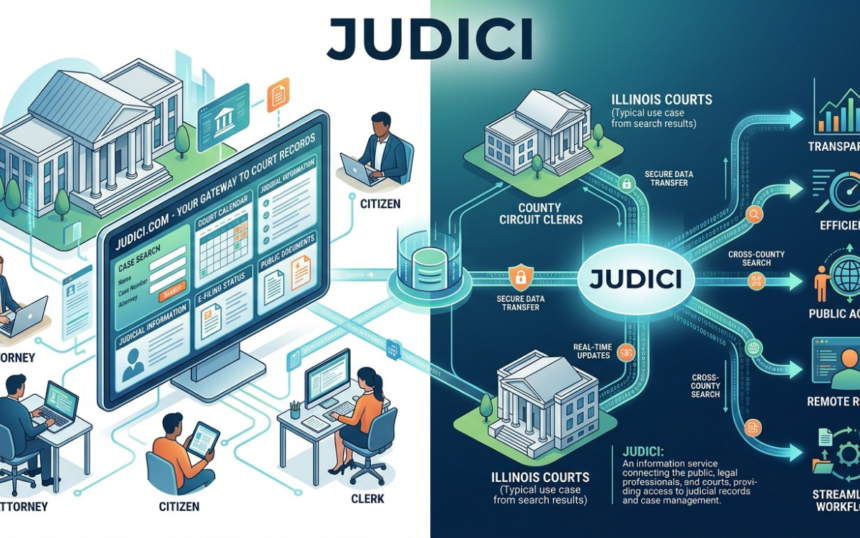
Judici.com is one of the most useful online tools for finding public court information from participating Illinois circuit courts, but it is also widely misunderstood. It is not the Illinois court system itself, it does not cover every county, and a search result should not automatically be treated as a certified or complete court record. The site is best understood as a court-data access platform that hosts and organizes information supplied by participating courts.
That distinction matters. If you are checking a criminal case, looking up a civil judgment, reviewing a hearing date, researching a traffic matter, or trying to understand a docket entry, knowing what the service does—and where its limits begin—can prevent expensive mistakes.
What Is Judici.com?
Judici.com is a privately operated online information service that provides access to court-record data originating from participating Illinois courts. Its public-access area allows users to search one participating court at a time for free, while paid services add multi-county searching, professional case-management features, reports, document access for eligible users, and case-update notifications.
As of the site information reviewed in August 2026, the homepage states that 82 participating courts can be searched free of charge. Illinois has circuit courts serving all 102 counties, so users should never assume that a statewide name search on the open web will reveal every Illinois court matter.
The platform can display several types of public case information, including:
- Litigant information
- Criminal charges, dispositions, and sentences
- Civil judgments
- Fines, fees, balances, and payment details
- Hearing dates
- Case minutes and docket history
- Will index information
- Certain case documents for authorized or eligible users
Availability varies by court, case type, access level, and Illinois rules governing electronic court records.
How Judici.com Case Search Works
For ordinary public users, the free service is court-specific. You select a participating county court and then search that court’s accessible records rather than running one unrestricted statewide search.
A typical lookup may involve a litigant name or case number. Judici’s own court-support materials describe public searching by name or case number, followed by access to information such as charges, dispositions, sentences, judgments, account history, payments, and case proceedings.
How to Search Judici.com More Accurately
A reliable search process looks like this:
- Identify the likely county first. Court records are maintained at the county level by circuit clerks, so location is often the fastest way to narrow the search.
- Confirm that the county participates. Check the participating-courts list before assuming a “no results” response means no case exists.
- Search the person’s legal name carefully. Try known spelling variations when appropriate. Names may appear differently across older or separate court systems.
- Use the case number when available. A case number is far more precise than a common name.
- Match identifying context. Review the case title, filing year, case type, role, and any other lawful identifiers shown before deciding you found the correct person.
- Read the history and disposition separately. A charge, filing, docket event, and final disposition are not the same thing.
- Verify high-stakes information with the circuit clerk. For legal deadlines, employment decisions, housing decisions, licensing, litigation, or other consequential matters, go to the court of origin.
This last step is essential because Judici.com expressly disclaims guarantees about accuracy, completeness, currentness, omissions, and delays. The applicable court remains the authoritative source of its own record.
What Do Illinois Case Numbers Mean?
Court case numbers contain useful clues. For example, Judici’s supporting documentation explains that a case number may contain a filing year, a case-type code, and a sequence number. A code such as CF generally identifies a criminal felony case, while CM denotes criminal misdemeanor, TR traffic, DT DUI, CV conservation, and OV ordinance violation.
Do not overread the code. It identifies the case category in the court’s recordkeeping structure; it does not, by itself, tell you the current severity of every charge, whether a person was convicted, or how a case ultimately ended.
That is why experienced researchers read court data in layers: case type → charges or claims → docket history → disposition → sentence or judgment → later activity.
How Current Is Judici.com?
There is no single update interval for every participating court. According to the service’s FAQ, synchronization frequency depends on the court and its software vendor; some data can synchronize very quickly, and case-data pages include a date and time indicating when data was last updated.
There is also a crucial difference between Last Update and Last Upload. A Last Update can reflect a modification to case information, while a Last Upload may simply mean Judici received a refreshed copy from the court. The company says it reloads case information from each court approximately monthly for database completeness, so a recent upload date does not prove that something new happened in the case.
This is a small interface detail with major practical value. If you are monitoring an active case, focus on the actual docket events and the update context—not just the newest-looking date on the screen.
Judici.com Coverage: Why “No Results” Does Not Always Mean “No Record”
A zero-result search can be misleading.
First, the relevant county may not participate. Second, electronic historical coverage differs from court to court. Third, some matters are excluded, secured, sealed, impounded, expunged, confidential, or otherwise restricted from remote public access. Judici’s FAQ specifically notes that juvenile, adoption, and court-impounded matters are common examples of records that may not be publicly available online.
There can also be differences between what is available electronically and what may be inspectable through the clerk under applicable law or court rules. Illinois’ electronic-access framework deliberately balances public access with privacy and confidentiality concerns.
So treat “no result” as no matching accessible result in that search, not as universal proof that no record exists.
Free Access vs. Paid Judici.com Services
The free public service is enough for many one-county lookups. Professional users, however, may need cross-county research or workflow tools.
Courtlook
Courtlook is designed primarily for Illinois attorneys and judges. Current site pricing reviewed in August 2026 lists a six-month Courtlook subscription at $155.70, described as a $25.95 monthly equivalent. Features include searching across participating counties, personalized case lists, attorney or judge schedules, calendar feeds, and Case Watch notifications; document access depends on account status, case type, and applicable access rules.
Multicourt
Multicourt allows one search across participating courts and can show multiple cases with information such as dispositions, histories, payments, fines, and fees. Current published pricing lists $149.70 for six months, or a $24.95 monthly equivalent.
Case Watch
Case Watch sends email notifications when case information changes, including new filings, hearings, or docket notes. It is included for Courtlook users according to current support materials, while the general public can use it as a stand-alone per-case service.
Pricing and eligibility can change, so verify the live subscription page before purchasing.
Judici.com vs. re vs. eFileIL
These services are often confused because all relate to Illinois court information, but they serve different functions.
Judici.com provides online access to data from its participating circuit courts and offers optional research and professional tools.
re is the Illinois Supreme Court’s statewide document repository and remote-access system. As of May 1, 2025, the Illinois Supreme Court also opened free remote public access through re to non-confidential reviewing-court documents filed on or after April 1, 2025, subject to stated limitations. The state has described broader public access as an evolving initiative.
eFileIL is the statewide electronic filing system used to submit court documents. It is about filing and electronic service, not simply searching public cases.
In practical terms: use the service that matches the task. Search, document retrieval, and filing are related court functions, but they are not interchangeable.
Privacy, Sealed Records, and Restricted Information
Public court records do not mean every piece of information in a court file is unrestricted online. Illinois remote-access policy recognizes that some documents are presumptively open while others may be restricted by statute, court rule, court order, or policy.
Judici.com also states that participating circuit clerks can restrict personal information displayed electronically. If a data element is secured on the free case-information page, subscribing does not necessarily unlock it.
That matters for anyone researching:
- Juvenile matters
- Adoption cases
- Sealed or expunged records
- Impounded cases
- Confidential filings
- Sensitive personal identifiers
- Certain secured case types or documents
If you believe a record should have been sealed, expunged, corrected, or removed, the appropriate starting point is generally the circuit clerk or court that owns the record, not the webhost. Judici itself tells users with case questions to contact the circuit clerk where the case was heard.
Can Judici.com Be Used for Background Checks?
It can be a research source, but this is where legal risk increases sharply.
Judici’s terms specifically address the Fair Credit Reporting Act (FCRA). They distinguish single-court pages hosted as an agent of a court from multi-court aggregated pages and warn that aggregated court information may be subject to FCRA requirements when used for purposes covered by that federal law.
If you are making an employment, housing, credit, insurance, or other regulated eligibility decision, do not assume that finding a court record online automatically makes your screening process compliant. Identity matching, permissible purpose, consumer-reporting obligations, notice requirements, dispute procedures, state law, and record accuracy can all matter.
For high-stakes screening, use a compliant process and obtain qualified legal guidance where appropriate.
Why Scraping Judici.com Is a Bad Idea
Developers and data brokers sometimes see public court pages and assume automated scraping is fair game. The service’s terms say otherwise.
Judici.com prohibits forms of automated or repetitive access outside permitted methods and restricts mass acquisition, retention, redistribution, and bulk use of court data. Its FAQ explains that one reason is data staleness: a case may later be expunged or impounded, a clerk may correct an error, or access rules may change.
For approved commercial use cases, the company offers narrowly scoped, person-centric web services rather than unrestricted bulk distribution.
The practical lesson is simple: public visibility is not the same as permission to harvest, republish, or warehouse records at scale.
Smart Research Tips Most Users Miss
The best way to use Judici.com is to treat it as a structured research tool, not a one-click truth machine.
- Search county-first. Knowing jurisdiction dramatically reduces false matches.
- Distinguish allegations from outcomes. A filed charge is not a conviction.
- Read the final disposition. “Dismissed,” “nolle prosequi,” “guilty,” “not guilty,” supervision, and other outcomes have very different meanings.
- Check timestamps intelligently. Last Upload and Last Update are not interchangeable.
- Look for multiple cases. A person may have matters in different counties or years.
- Verify identity before drawing conclusions. Common names create obvious false-positive risk.
- Use the clerk for certified information. Online convenience does not replace official certification.
- Re-run consequential searches. Court data changes. Fresh research is safer than relying on an old saved copy.
Frequently Asked Questions About Judici.com
1. Is Judici.com an official Illinois government website?
No. Judici.com expressly states that it is operated by Judici, not by a court. However, it hosts data originating from participating courts and, on certain single-court pages, acts as an agent of the relevant court under its terms. For certified records or authoritative case questions, contact the circuit clerk that maintains the case.
2. Is Judici.com free to use?
Yes, public users can search one participating court at a time without a subscription. Paid products such as Courtlook and Multicourt add cross-court searching, workflow tools, reports, notifications, or specialized access.
3. Does Judici.com show every Illinois court case?
No. The site covers participating courts rather than every possible Illinois court record, and electronic access is also limited by case type, historical availability, privacy rules, sealing, expungement, impoundment, and other restrictions. A missing result should therefore be verified with the relevant circuit clerk when the issue matters.
4. How often are records on Judici.com updated?
Update frequency varies by participating court and software vendor. Case-data pages display update information, and the service also performs periodic reloads for completeness. A recent Last Upload date may reflect a database refresh rather than new case activity.
5. Can I remove my information from Judici.com?
You generally cannot ask the site to erase an otherwise public court record simply because you do not want it visible. If a record qualifies for sealing, expungement, correction, or another restriction, that process typically occurs through the court. Once the court changes what is publicly available, downstream electronic access should reflect the court’s status according to applicable processes and update cycles.
Final Takeaway
Judici.com is valuable because it makes fragmented Illinois circuit-court information easier to find, read, and monitor. Used correctly, it can save a trip to the courthouse, surface case history quickly, clarify hearing and payment information, and give attorneys or researchers efficient multi-county tools.
But use it with disciplined verification. Confirm the county, identify the correct person, distinguish charges from dispositions, check update context, and contact the circuit clerk whenever accuracy has legal or financial consequences. If you need statewide documents or electronic filing rather than a participating-court case lookup, also evaluate re and eFileIL so you are using the right Illinois court system for the job.