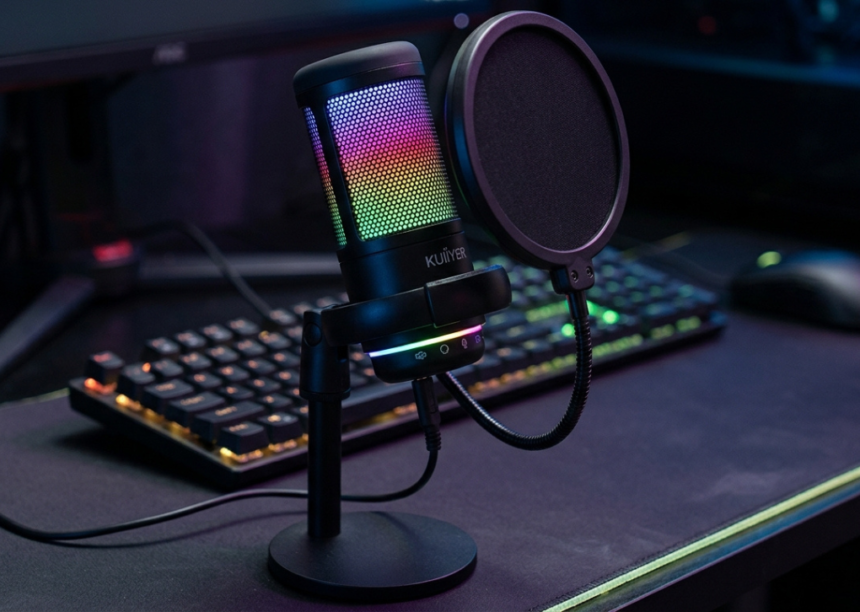
he Kuiiyer microphone has gained attention among gamers, beginner streamers, remote workers, and content creators looking for affordable audio equipment without the complexity of professional studio gear. Unlike expensive studio microphones that require mixers, audio interfaces, and technical knowledge, many Kuiiyer models focus on simplicity: plug in the device, adjust the position, and start recording.
For people building a first streaming setup or upgrading from a laptop microphone, the appeal is clear. Better audio immediately improves video calls, gaming communication, podcasts, voiceovers, and online presentations. A viewer may tolerate average video quality, but poor audio often causes people to leave.
This detailed guide explores what makes the Kuiiyer microphone interesting, where it performs well, its limitations, and how to decide if it fits your needs.
What Is the Kuiiyer Microphone and Who Is It For?
The Kuiiyer microphone is an affordable audio recording solution available in different categories, including USB condenser gaming microphones and wireless microphone systems. The brand appears across online marketplaces with products designed for PC users, streamers, educators, vloggers, and casual recording environments.
The most common users include:
- Beginner content creators recording YouTube videos or short-form content.
- Gamers who need clearer communication during multiplayer sessions.
- Remote professionals attending meetings and online conferences.
- Students and teachers creating online lessons.
- Podcast beginners testing audio production before investing in premium equipment.
A key advantage is accessibility. Many users do not want to learn complicated audio engineering before improving their sound. A simple USB microphone can solve that problem.
Kuiiyer Microphone Design and Build Quality
A major selling point of the Kuiiyer microphone lineup is its consumer-friendly design. Several models use desktop-oriented designs with stands, LED lighting, USB connectivity, and controls intended for quick adjustments.
The design approach focuses more on convenience than professional studio flexibility. That means users typically get:
- Desktop placement for gaming desks and home offices.
- Compact construction that does not require a large recording space.
- Simple controls for volume adjustment or muting on selected models.
- Gaming-focused aesthetics with RGB lighting options on some versions.
For a bedroom studio or workspace, this type of design makes sense. The microphone does not demand a complicated setup area.
However, expectations should remain realistic. Budget microphones usually prioritize affordability and ease of use over premium materials, interchangeable capsules, or advanced studio features.
How Does the Kuiiyer Microphone Sound?
Sound quality is the most important factor when choosing any microphone. The Kuiiyer microphone is generally positioned as an entry-level option designed to provide clearer voice capture compared with built-in laptop microphones or basic headset microphones.
Many models use a condenser microphone design with a cardioid pickup pattern, which is common among gaming and streaming microphones. Cardioid microphones are designed to capture sound primarily from the front while reducing some noise coming from the sides and rear.
This makes the microphone suitable for:
- Voice chats on Discord.
- Live streaming.
- Podcast conversations.
- Online meetings.
- Gaming commentary.
- Basic voice recording.
The biggest improvement users usually notice is vocal clarity. Words become easier to understand, background noise can become less distracting, and communication feels more professional.
Still, microphone placement matters. Even an expensive microphone can sound poor when positioned incorrectly.
Best Settings and Placement Tips for Kuiiyer Microphone Users
Getting the best results from a Kuiiyer microphone depends heavily on setup. Many beginners blame the hardware when the real issue is distance, room acoustics, or incorrect gain settings.
Follow these practical tips:
Keep the Microphone Close
Place the microphone around 10 to 20 centimeters from your mouth when possible. Speaking too far away increases room echo and makes your voice sound thin.
Adjust Gain Carefully
Higher gain is not always better. Excessive gain captures keyboard sounds, fans, traffic, and room reflections.
A better approach:
- Start with medium gain.
- Record a short test clip.
- Increase volume gradually.
- Avoid audio peaks that create distortion.
Use a Pop Filter or Wind Protection
Strong sounds like “P” and “B” can create unpleasant bursts of air. A pop filter helps create smoother recordings, especially for podcasts and voiceovers.
Improve Your Recording Space
A microphone captures the room around you. Soft furniture, curtains, carpets, and wall decorations can reduce unwanted reflections.
Kuiiyer Microphone for Gaming and Streaming
Gaming is one of the strongest use cases for the Kuiiyer microphone. Streamers need reliable voice communication, and viewers expect understandable commentary.
A gaming microphone should provide:
- Clear speech transmission.
- Low setup complexity.
- Convenient desk placement.
- Compatibility with common operating systems.
Some Kuiiyer gaming microphone listings highlight compatibility with computers, PlayStation systems, Mac devices, and streaming platforms.
For new streamers, the biggest advantage is not achieving studio-level audio. It is creating a noticeable improvement over built-in microphones.
A beginner using a dedicated microphone often sounds more confident and professional immediately.
Is the Kuiiyer Microphone Good for Podcasting?
The Kuiiyer microphone can work well for beginner podcasts, interviews, and spoken-word recordings where affordability is a priority. A clean voice recording matters more than having expensive equipment when starting out.
For a beginner podcast setup, focus on:
- Quiet recording environment.
- Correct microphone distance.
- Consistent speaking volume.
- Basic audio editing.
However, professional podcasters who require broadcast-level sound may eventually move toward higher-end microphones with better noise rejection, wider frequency response, and professional connectors.
The Kuiiyer microphone is best viewed as a starting point rather than a final studio investment.
USB vs Wireless Kuiiyer Microphone Options
Kuiiyer products are available in different formats. Some models focus on USB desktop recording, while others are wireless systems designed for presentations, video recording, and mobile use.
USB Models
USB versions are ideal for:
- PC gaming.
- Streaming.
- Home recording.
- Video calls.
Advantages:
- Easy plug-and-play connection.
- No additional audio interface required.
- Fast installation.
Wireless Models
Wireless versions provide more freedom of movement and are useful for:
- Lectures.
- Presentations.
- Interviews.
- Mobile video creation.
Advantages:
- Less cable clutter.
- Greater movement flexibility.
- Better for active recording situations.
The right choice depends on your workflow. Desktop creators usually benefit from USB models, while presenters and mobile creators may prefer wireless systems.
Kuiiyer Microphone Pros and Cons
Before purchasing, consider both strengths and limitations.
Advantages
- Affordable entry point for beginners.
- Simple setup without complicated equipment.
- Suitable for gaming, streaming, and calls.
- Multiple formats available, including USB and wireless options.
- Better voice quality than many built-in microphones.
Limitations
- Not designed to replace professional studio microphones.
- Advanced audio controls may be limited.
- Room noise can still affect recordings.
- Build quality varies between models.
Understanding these trade-offs prevents disappointment.
How to Choose the Right Kuiiyer Microphone
Choosing the best Kuiiyer microphone depends on your main purpose.
For gaming:
Choose a USB condenser model with easy controls and stable desktop placement.
For podcasting:
Prioritize voice clarity, microphone positioning, and a quiet environment.
For teaching or presentations:
A wireless option may provide better movement flexibility.
For casual meetings:
Almost any simple USB model can provide a noticeable upgrade.
Before buying, check:
- Connection type.
- Device compatibility.
- Included accessories.
- Pickup pattern.
- User reviews.
- Warranty information.
Frequently Asked Questions About Kuiiyer Microphone
1. Is the Kuiiyer microphone good for beginners?
Yes. The Kuiiyer microphone is mainly attractive for beginners because it focuses on affordability and easy setup. Users who need better audio for gaming, meetings, streaming, or basic recordings can benefit from moving away from built-in microphones.
2. Does the Kuiiyer microphone work with PC and Mac?
Many USB Kuiiyer models are listed as compatible with Windows and Mac systems. Compatibility can vary by model, so buyers should check the exact product specifications before purchase.
3. Can I use a Kuiiyer microphone for YouTube and streaming?
Yes. The microphone category is commonly marketed toward YouTube creators, Twitch streamers, gamers, and online content producers. A good setup and recording environment will have a major impact on final audio quality.
4. Does the Kuiiyer microphone remove all background noise?
No microphone completely eliminates background noise. Cardioid microphones can reduce some unwanted sounds, but keyboard noise, loud fans, and echoes may still be recorded if the environment is noisy.
5. Is the Kuiiyer microphone worth buying?
The Kuiiyer microphone is worth considering for users who want an affordable upgrade from basic microphones. It is most suitable for beginners, gamers, students, and casual creators who value convenience and reasonable sound quality.
Final Verdict: Should You Buy a Kuiiyer Microphone?
The Kuiiyer microphone offers a practical entry point into better audio. It is not designed to compete with premium studio equipment, but it delivers the features many everyday users actually need: simple setup, clearer communication, and flexible use.
If you are starting a gaming channel, improving online meetings, recording your first podcast, or upgrading your desk setup, this type of microphone can be a smart first step.
Before purchasing, identify your main use case, select the correct model type, and spend time optimizing placement and settings. Good audio is not only about the microphone itself. It is about how you use it.