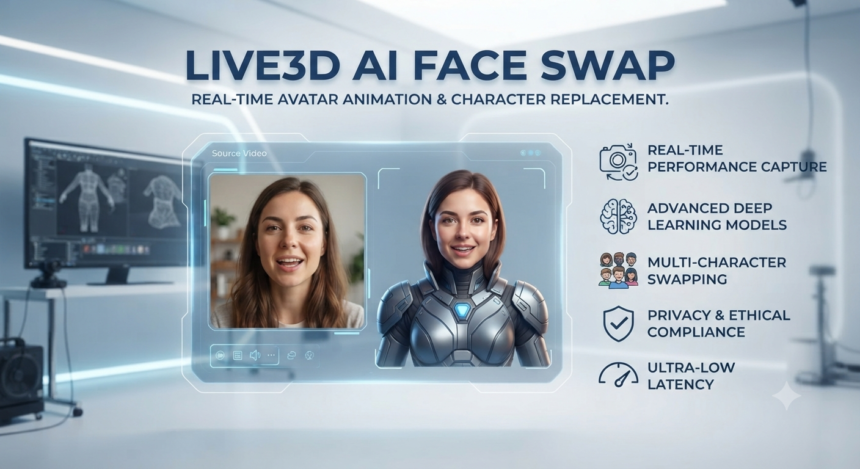
Live3D AI Face Swap is a browser-based tool designed to replace a face in a photo, GIF, or short video without requiring traditional editing skills. Current public descriptions position it as a fast, beginner-friendly option with no-login access, watermark-free results, unlimited photo swaps, and limited free video processing, although these limits can change and should be checked on the tool’s upload page before use.
The simple interface is the main attraction. Upload the original media, add a clear source-face image, let the system process the swap, and download the result. This Live3D AI Face Swap review examines the bigger questions: whether the output looks natural, protects personal data, and can be used responsibly.
What Is Live3D AI Face Swap?
Live3D AI Face Swap is an online video editing service which attempts to automate a laborious process only visual-effects professionals used to handle before. Instead of manually isolating each face part, tracking movements, painting, and adjusting colors to match the target, the software tries to perform all these actions on its own.
The public description mentions that the service allows users to edit photos, animated GIFs, videos, and multiple faces in one image. It also states that it is possible to design a face or an image with the help of the AI Image Generator feature, which may be an additional tool depending on the territory and version of the service.
Therefore, one can conclude that it is better to categorize the service as a quick editor rather than a professional compositor. The tool is perfect for editing memes, characters, social media posts, thumbnails, videos, fictional images, and prototypes without investing much time in one project. However, most advanced compositing tasks usually require professional software which offers more control over the editing process.
How Live3D AI Face Swap Works
The basic Live3D AI Face Swap workflow is straightforward, but understanding the role of each upload can prevent disappointing results. Each stage affects facial alignment, identity preservation, blending, and final realism.
1. Choose the Target Photo, GIF, or Video
The target is the media you want to change. It contains the person whose face will be replaced while the original pose, body, background, framing, and—when working with video—movement usually remain. In face-swapping research, the source provides identity while the target supplies attributes such as pose, expression, lighting, and background.
Select media with a face that is visible for most of the frame. Heavy motion blur, extreme side angles, covered facial features, tiny faces, rapid cuts, or harsh shadows make automated face mapping more difficult.
2. Upload a Source-Face Image
The source image supplies the identity that will appear in the result. A sharp, front-facing portrait with even lighting gives the system more reliable information about the eyes, nose, mouth, jawline, and overall facial structure.
Avoid screenshots compressed several times by messaging apps. A clean original portrait generally contains better edge detail and fewer artifacts around the hairline, eyelids, teeth, and skin texture.
3. Generate the Swap
After both files are uploaded, the system detects facial landmarks, aligns the source identity with the target face, blends the reconstructed region, and produces an edited output. For video, this operation must remain reasonably consistent across many frames, which is more demanding than editing one still image.
Public descriptions of Live3D AI Face Swap emphasize an upload-generate-download process with fast browser-based processing and no specialist editing knowledge required. That convenience makes testing easy, but it does not remove the need for a careful quality review.
4. Inspect Before Publishing
Do not judge the result only from a small preview. Open it at full size and check the eyes, eyebrows, teeth, hairline, jaw edges, earrings, glasses, hands crossing the face, and transitions between light and shadow.
For video, replay the most difficult moments several times. Look for flickering skin texture, a drifting face shape, mismatched lip movement, sudden changes in identity, or a mask-like border around the cheeks.
Key Features of Live3D AI Face Swap
The appeal of Live3D AI Face Swap comes from accessibility rather than a long list of professional controls. Its core value is turning a technically difficult editing task into a guided browser workflow.
Photo Face Swapping
Still-image swapping is usually the easiest format for an automated tool to handle. There is no frame-to-frame consistency problem, so the system can focus on alignment, expression, lighting, and blending within a single image.
Current public descriptions claim unlimited photo swaps and watermark-free exports. Treat those as current platform claims rather than permanent guarantees because free limits, file rules, and export policies can be changed without notice.
Video and GIF Support
Video face replacement can create more engaging results, but it introduces extra failure points. The face must remain stable while the subject turns, speaks, blinks, passes behind an object, or moves through changing light.
One published overview reported up to 10 free video swaps per day, while other current directories simply describe video use as limited. Verify the live allowance before planning a campaign or batch project around it.
Multi-Face Swapping
Group-photo support is useful when more than one identity needs to be replaced. It is also harder to execute well because the system must correctly associate each source face with the intended target and maintain realistic scale, lighting, and direction.
Use distinct source portraits and test one face at a time when the interface permits it. Similar-looking faces, overlapping people, small background subjects, and crowded compositions increase the chance of incorrect mapping.
No-Install Browser Workflow
A browser tool removes the need for a powerful editing workstation or complex local setup. That makes Live3D AI Face Swap convenient for occasional users, social media teams, students, and creators who want a fast experiment rather than a full production pipeline.
The trade-off is that media must be uploaded to a remote service. Convenience should therefore be balanced against privacy, consent, confidentiality, and the sensitivity of the material.
How Good Is the Output Quality?
Live3D AI Face Swap quality depends more on the input pair than many users expect. A strong source portrait cannot fully rescue a target video with severe motion blur, and a high-resolution target cannot compensate for a tiny or heavily filtered source face.
The best results usually come from images that share several characteristics. Aim to reduce the visual differences the model must reconcile:
- Similar head angle: Front-facing source and front-facing target.
- Compatible expression: Neutral with neutral, smiling with smiling.
- Balanced lighting: Soft, even illumination without clipped highlights.
- Adequate resolution: Enough pixels around the face for clean feature mapping.
- Limited obstruction: No hands, masks, microphones, hair, or glasses hiding key landmarks.
- Consistent age and proportions: Extreme differences often look less natural.
For most first-time users, Live3D AI Face Swap performs best when the source and target already resemble each other in pose, framing, and illumination. A useful quality test is to zoom in to 200 percent and then view the media at normal size; zooming reveals technical flaws, while normal viewing shows whether those flaws are actually distracting in context. Research on high-fidelity face swapping likewise identifies identity shape, pose, lighting, background, and occlusion as central realism challenges.
Why Face Swaps Sometimes Look Artificial
The most common problems are not random. They usually come from a mismatch between the two faces or from missing visual information.
Watch for the following warning signs. One flaw may be acceptable in a joke post, but several usually make the edit look synthetic:
- A jawline that does not follow the target head.
- Skin tone that changes sharply around the cheeks or forehead.
- Eyes that appear too sharp, too soft, or slightly misaligned.
- Teeth that change shape between video frames.
- Facial texture that flickers when the head turns.
- Hair or glasses that cut unnaturally into the generated face.
- Expressions that do not match the original performance.
Re-running Live3D AI Face Swap with a better source portrait is often more effective than repeatedly generating from the same weak inputs. Choose a source image closer to the target pose instead of assuming another processing attempt will solve the geometry.
Best Use Cases
Live3D AI Face Swap is most suitable for low-risk creative projects in which viewers understand that the visual has been altered. The safest applications are transparent, consent-based, and unlikely to affect someone’s reputation or decisions.
Social Media and Meme Content
Creators can test humorous character changes, reaction posts, fictional celebrity-style concepts, themed profile images, and short-form visual jokes. Clear labeling is wise when realism could cause confusion.
Storyboards and Creative Concepts
Filmmakers, designers, and advertisers can use rough swaps to explore casting ideas, character direction, thumbnail concepts, or scene composition before committing to a costly shoot. These drafts can speed up internal discussion when they are kept clearly separate from final approved material.
A concept image should not be presented as an approved endorsement. A realistic face swap involving an actor, public figure, employee, customer, or influencer can create false associations even when the original intent was only experimental.
Educational or Historical Demonstrations
A teacher or museum team could create an obviously dramatized scene to support a lesson, provided the result is labeled and does not misrepresent invented speech or behavior as historical evidence. Context should make clear where the historical record ends and creative reconstruction begins.
Personal Entertainment
Consensual edits involving your own face or images supplied by friends can be fun. Store the finished media responsibly, avoid humiliating contexts, and confirm that everyone involved is comfortable with public sharing.
Privacy and Safety: What to Check Before Uploading
Before using Live3D AI Face Swap, treat every face image as sensitive personal data. A face is not merely decorative content; it can be connected to a person’s identity, reputation, social accounts, workplace, and biometric characteristics.
The accessible public descriptions reviewed for this article explain the creative workflow but do not provide enough detail to independently confirm how long uploaded faces are retained, whether files are used to improve models, where processing occurs, or how deletion requests are handled. Check the current privacy policy and terms directly before uploading confidential, commercial, or personally sensitive material.
A responsible Live3D AI Face Swap workflow begins before any file reaches the upload box. Use this pre-upload checklist:
- Confirm that you own the media or have permission to edit it.
- Get clear consent from every identifiable person being swapped.
- Avoid children’s images unless a parent or guardian has approved the exact use.
- Do not upload passports, staff IDs, medical images, private client footage, or intimate content.
- Remove location data and unnecessary metadata where practical.
- Do not use a face swap to pass identity verification or mislead financial, legal, or security systems.
- Label realistic synthetic media when viewers could mistake it for authentic footage.
- Delete local drafts and exports that are no longer needed.
NIST’s guidance on synthetic content highlights consent, disclosure, and transparency as core responsible-media concepts. It also notes that deepfake detectors can produce substantial errors and may perform worse after compression or resizing, so “a detector did not flag it” is not proof that altered media is authentic.
Is Live3D AI Face Swap Safe and Legal?
The software itself can be used for harmless or harmful purposes. Legality depends on the content, consent, jurisdiction, method of distribution, and whether the result is used for fraud, harassment, defamation, sexual exploitation, election deception, false endorsement, or impersonation.
Never create non-consensual intimate imagery. In the United States, the TAKE IT DOWN Act covers real, digitally altered, and AI-generated intimate images shared without consent and requires covered platforms to provide a removal process; the FTC says covered platforms must remove qualifying reported material and known identical copies within 48 hours.
Commercial users should also consider publicity rights, copyright, trademark, advertising rules, employment policies, client contracts, and platform-specific synthetic-media requirements. “The tool allowed me to generate it” is not the same as “I have the legal right to publish or monetize it.”
Live3D AI Face Swap Pros and Cons
Advantages
- Easy learning curve: No masking, keyframing, or manual face tracking.
- Browser-based access: No large installation for basic experiments.
- Multiple media formats: Public listings describe photo, GIF, and video support.
- Low barrier to testing: Public sources currently describe free access and no-login use.
- Clean-looking exports: Watermark-free output is repeatedly listed as a feature.
Limitations
- Results vary sharply by input quality.
- Video consistency can break during fast movement or occlusion.
- Manual correction tools appear limited compared with professional editors.
- Cloud uploading creates privacy questions for sensitive faces.
- Free limits and file restrictions may change.
- The publicly accessible product descriptions do not clearly document the underlying model architecture.
That final point matters. Claims that a specific tool uses a particular neural architecture should not be repeated as fact unless the developer publishes technical documentation. The visible output tells you what the service can produce, not exactly how its private model was built.
How to Get Better Results From Live3D AI Face Swap
A disciplined input process produces better results than endless random generations. Prepare the files first, then test the most difficult part of the project before processing everything.
- Start with a high-resolution target. Use the original file rather than a social-media download.
- Choose a matching source angle. A three-quarter target needs a similar three-quarter source.
- Crop distractions carefully. Keep the full face visible without excessive background.
- Match expression and lighting. This reduces unnatural stretching and color correction.
- Test a still frame first. For video, use a representative frame to judge compatibility.
- Keep the first clip short. Process a difficult 3–5 second segment before committing to a longer edit.
- Review frame transitions. Pause where the subject turns or an object crosses the face.
- Add disclosure before publishing. A small “AI-edited” or “face-swapped” label can prevent confusion.
- Keep evidence of consent. This is especially important for client, employee, talent, or influencer content.
- Export a draft before final distribution. Check it on both mobile and desktop screens.
For professional campaigns, add a human review stage. Someone who did not create the edit is more likely to notice uncanny eye movement, identity drift, misleading context, or brand-safety problems.
Who Should Use It—and Who Should Avoid It?
Live3D AI Face Swap suits beginners, meme creators, social media editors, concept artists, educators, and small creative teams working with consented material. It is most valuable when speed and simplicity matter more than frame-perfect control.
It is a poor fit for confidential corporate footage, legal evidence, identity documents, medical content, deceptive endorsements, non-consensual edits, or any project requiring guaranteed data handling and audited security. High-stakes film work may also need desktop compositing tools that provide masks, tracking controls, color management, frame repair, and local processing.
Final Verdict
Live3D AI Face Swap offers a convenient entry point into AI-assisted photo and video editing. Its strongest qualities are the low-friction browser workflow, support for several media formats, and the ability to test a face replacement without learning professional compositing.
Its biggest limitations are equally important: output quality depends heavily on source material, video artifacts can appear during difficult motion, and public feature pages do not answer every privacy or technical question a professional user should ask. Use it for consent-based creative experiments, inspect every result carefully, and confirm the current privacy terms and usage limits before uploading valuable or sensitive media.
Whether Live3D AI Face Swap is the right choice depends on the sensitivity of the media and the level of control the project requires. The best next step is simple: begin with a non-sensitive still image, use two well-lit portraits with similar angles, generate one test, and evaluate the eyes, jawline, skin blend, and disclosure needs before moving to video.
Frequently Asked Questions
Is Live3D AI Face Swap Free?
Current public listings describe free photo swapping, no-login access, watermark-free output, and a limited daily allowance for video. These terms are not guaranteed permanently, so check the live tool for current file limits, daily quotas, and paid options before starting a large project.
Does Live3D AI Face Swap Work With Videos?
Yes, current product descriptions say it supports short video face replacement as well as photos and GIFs. Video results are more sensitive to fast movement, changing lighting, profile angles, obstructions, and compression than still-image results.
Can I Use Live3D AI Face Swap Without Creating an Account?
Publicly available reviews currently describe a no-sign-up workflow. Because access rules can change, confirm whether an account is required when you visit and review what data is collected even when no formal registration is requested.
Does Live3D AI Face Swap Add a Watermark?
Current listings repeatedly describe watermark-free exports. Still, inspect the generated file and the latest terms before using it commercially, since the absence of a watermark does not grant rights to the source image, target footage, person’s likeness, music, film clip, or brand elements.
What Kind of Photo Produces the Most Realistic Face Swap?
Use a sharp, evenly lit portrait in which the full face is visible and the camera angle closely matches the target. Avoid heavy filters, extreme expressions, low resolution, motion blur, sunglasses, covered cheeks, strong backlighting, and images downloaded repeatedly from social platforms.